Olliter Manuals

Diversity Reception
Note
This feature is available starting from OL-Master software version 2.2.0.7 or later.
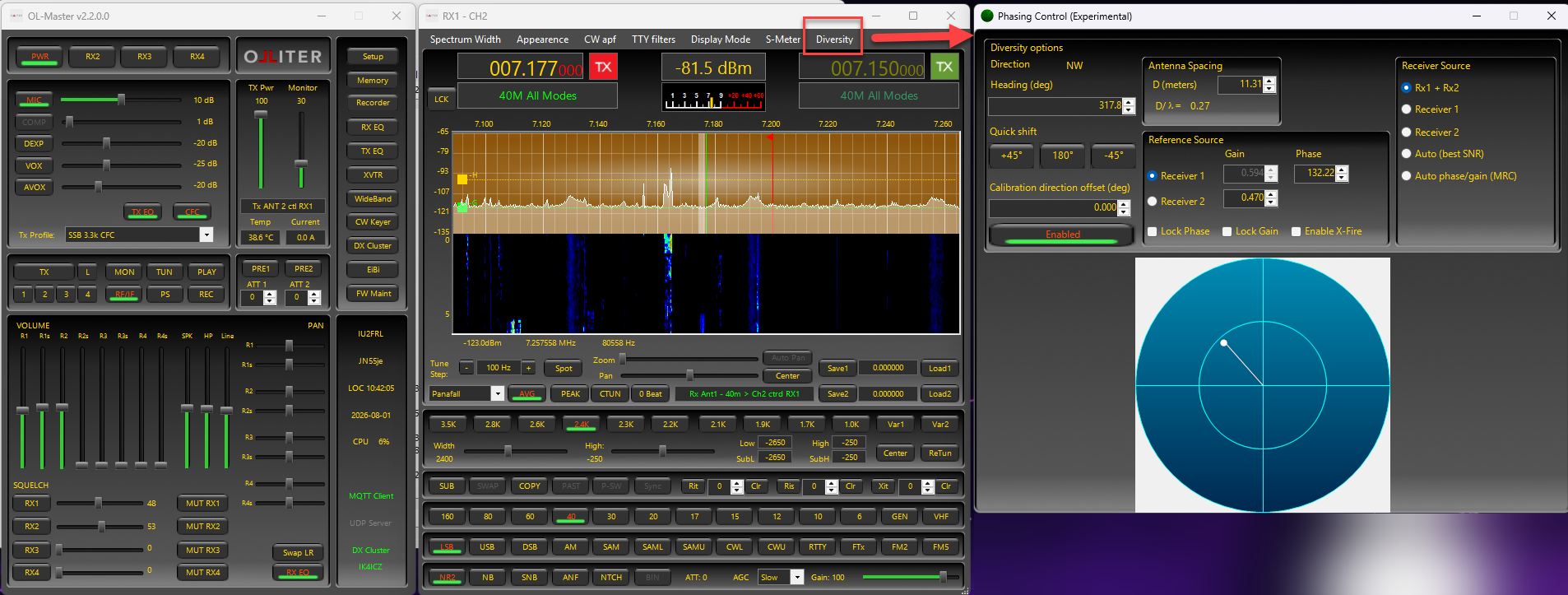
This guide explains how to use the Diversity window in OL-Master and how to choose values for each control.
Warning
The diversity feature is highly experimental and is still being refined. Expect some rough edges and occasional unexpected behavior.
Table of contents
- What diversity reception does
- Requirements
- Things to know
- Per-band presets
- Using diversity mode
- Example of diversity reception usage
- Diversity reception troubleshooting
- Detailed explanation
What diversity reception does
Diversity reception combines the signals from two receivers (RX1 and RX2) tuned to the same frequency, typically fed from two separate antennas. Because fading, noise and interference rarely affect both antennas identically, combining or switching between them can improve copy on weak or fluttery signals (a common technique on the lower HF bands).
Note
The effectiveness of the diversity feature depends on the antennas used and the propagation conditions. In some cases, it may not provide any improvement over a single receiver.
Requirements
- An Olliter radio model that supports dual DDC diversity (SDR20 / SDR300).
- Two receive antennas connected in a way that gives RX1 and RX2 a genuinely different view of the signal (e.g. separate antennas, or the same antenna with a phasing/space difference).
Things to know
Before using diversity, keep these points in mind:
- Diversity works best when RX1 and RX2 receive the same signal through two meaningfully different paths (for example, two separate antennas, or antennas with useful spacing/orientation differences).
- With suitable antenna separation, Rx1 + Rx2 (manual) and Auto phase/gain (MRC) can improve readability by combining both receivers, especially with two identical antennas placed at a given physical distance.
- With two different antennas, mounted on different locations, the Auto (SNR) mode might produce better results, as the receive antenna is automatically switched based on the best signal-to-noise ratio, acting as an automatic antenna switch.
- Feeding both receivers from the same antenna path usually provides little or no diversity benefit.
- The Diversity window controls RX1 output only, and it is opened from the RX1 window.
- For correct operation:
- Tune RX1 and RX2 to the same frequency, mode, and filter.
- Keep the RX2 audio muted while diversity is active, to avoid monitoring both paths separately.
- Ensure the RX2 receiver/window is active.
For a quick setup walkthrough, see Example of diversity reception usage.
Per-band presets
Gain, Phase, and the Reference Source (Receiver 1/2) choice are saved automatically per band — switching bands recalls whatever values you last used on that band, so you do not need to re-tune every time you change bands. The Receiver Source mode (Receiver 1 / Receiver 2 / Rx1+Rx2 / Auto / MRC) itself is not saved between sessions — the window always starts in Rx1 + Rx2 mode when reopened.
Using diversity mode
Opening the window
Open the Diversity window from the RX1 window's menu. The window title is "Phasing Control (Experimental)" — the feature is functional but still being refined, so expect some rough edges.
Turning diversity on/off
The Enabled button at the bottom of the "Diversity options" box is the master switch. It must be checked (green, "Enabled") for any combining to take effect; when unchecked (red, "Disabled") RX1 behaves as if diversity were not present at all. Leave it off until you have picked a Receiver Source mode below.
Receiver Source — choosing what you actually hear
The Receiver Source box selects the operating mode. Only one option is active at a time:
| Option | What it does | When to use it |
|---|---|---|
| Receiver 1 | Output is RX1 only, unmodified. | Diagnosing/comparing antennas, or when RX2 is unusable. |
| Receiver 2 | Output is RX2 only, unmodified. | Same as above, for the other antenna. |
| Rx1 + Rx2 | Manual phase/gain combining of both receivers, steered by the Reference Source controls (see below). | You want full manual control over the combine — the classic "phasing" workflow, useful for nulling a specific direction of interference. |
| Auto (best SNR) | Continuously measures the power of both branches and switches to whichever is currently stronger, with hysteresis to avoid rapid switching. | The easiest "just make it better" option — fading/QSB where one antenna is usually clearly better than the other at any given moment. |
| Auto phase/gain (MRC) | Continuously estimates the relative phase and gain of RX2 against RX1 and combines them adaptively (maximal-ratio combining), without any manual tuning. | Similar situations to manual phasing, but without needing to dial in gain/angle yourself. Generally the best starting point for combined (non-switched) diversity. |
Note: the Reference Source box and the radar/steering controls described below are only meaningful in Rx1 + Rx2 mode. In every other mode they are automatically disabled (greyed out) because the DSP ignores or overrides their values there — nothing is being hidden from you, they simply have no effect.
Also note: Auto phase/gain (MRC) always uses RX1 as its internal phase/gain reference, regardless of what is selected in Reference Source — there is currently no way to make RX2 the MRC reference from the UI.
Reference Source — manual phasing controls (Rx1 + Rx2 mode only)
When Receiver Source is Rx1 + Rx2, the Reference Source box lets you manually dial in how RX2 (or RX1) is combined with the other receiver:
- Receiver 1 / Receiver 2 — chooses which receiver is treated as the fixed reference (gain 1.0, phase 0°). The other receiver is the one you steer with the controls below. This selection is remembered per band.
- Gain — the relative amplitude of the non-reference receiver. Start at
1.000(equal level) and adjust up or down while listening; too much gain imbalance reduces the benefit of combining. - Phase — the relative phase (in degrees, -180 to +180) applied to the non-reference receiver. This is the primary "steering" control: rotate it while listening to a fixed background noise/interference source and stop where it's quietest (a null), or where the wanted signal is loudest (a peak).
- Lock Gain / Lock Phase — when dragging the radar display with the mouse, these checkboxes freeze the Gain or Phase value so only the other one changes. Useful for adjusting one parameter at a time.
- Enable X-Fire (cross-fire) — adds a fixed 180° phase offset, used for antenna feed arrangements wired for cross-fire nulling. Leave unchecked unless your antenna setup specifically calls for it.
- Radar display — a visual representation of the current gain/phase vector. Click and drag inside the circle to set Gain (distance from center, 0–1) and Phase (angle) at the same time; this is usually faster than typing values.
- +45 / 180 / -45 buttons — quick phase shifts relative to the current value, useful for jumping to a rough null before fine-tuning with Phase.
- Calibration direction offset — a fixed calibration offset (in radians) added to the angle calculation, used to align the on-screen compass direction indicator with your actual antenna heading. This does not need to be touched unless you rely on the compass readout (N/NE/E/…) being accurate.
Manual phasing workflow
- Set Receiver Source to Rx1 + Rx2.
- In Reference Source, pick which receiver is your reference (usually the "main"/best antenna).
- Set Gain to
1.000on both receivers as a starting point. - Slowly adjust Phase (or drag the radar display) while listening, and stop where interference is weakest or the desired signal is clearest.
- Fine-tune Gain afterward if one antenna is consistently weaker.
- Check Enabled to apply the combination to RX1's audio.
Example of diversity reception usage
Open the Setup menu and configure your band as follows:
| Setting | Selection |
|---|---|
| CH1 RX Antenna | ANT 1 |
| CH2 RX Antenna | ANT 2 |
| CH→RX Mapping: RX1 | CH1 |
| CH→RX Mapping: RX2 | CH2 |
| Force CH1 RX Antenna also for CH2 | Off |
| Antenna Splitter | Must display OFF |
RX1 and RX2 should be tuned to the same frequency, mode, filter, and sample rate. Configure the antenna selection for every band you intend to use because the antenna tables are band-specific.
Then test before using Auto/MRC:
- Open Diversity and enable it.
- Select Receiver 1. You should hear ANT1.
- Select Receiver 2. You should hear ANT2.
- Disconnect ANT1 and ANT2 individually to confirm the correspondence.
- Only after that, try Auto (best SNR) or Auto phase/gain (MRC).
Tip
A common trap is the splitter: selecting the same antenna for CH1 and CH2 automatically enables it, while Force CH1 RX Antenna also for CH2 enables it explicitly. Either case makes both branches receive the same antenna, defeating diversity. The physical relay mapping confirms CH1/ANT1 and CH2/ANT2 are separate inputs.
Also, “Auto (best SNR)” currently selects by smoothed received power, not a true noise-normalized SNR measurement. First perform the Receiver 1/Receiver 2 isolation test; if that fails, the problem is routing/configuration rather than the adaptive algorithm.
Diversity reception troubleshooting
- No audible difference between modes: confirm Enabled is checked, and that RX1/RX2 are actually tuned to the same frequency from two distinct antennas.
- Reference Source / radar controls are greyed out: this is expected outside of Rx1 + Rx2 mode — switch to that mode to use them.
- Auto (best SNR) seems to switch too often or too rarely: this is governed by internal smoothing/hysteresis parameters that are not currently exposed in the UI; if this is a problem in practice, report it so the defaults can be tuned or exposed as settings.
Detailed explanation
Auto phase/gain (MRC)
Auto phase/gain (MRC) is the adaptive combine mode. Instead of asking you to set phase and gain manually, it continuously aligns RX2 to RX1 and balances their contribution automatically.
In practical terms, it does three things while you listen:
- Compares RX1 and RX2 in real time.
- Adjusts their relative phase and level automatically.
- Combines them with stronger weighting on the cleaner branch.
This makes it useful for fading or fluttery signals where the best phase/level match changes over time.
How it differs from manual Rx1 + Rx2
- Manual Rx1 + Rx2: Gain and Phase stay fixed until you change them.
- Auto phase/gain (MRC): Gain and phase are updated continuously to follow changing conditions.
- In Auto phase/gain mode, the manual Reference Source/radar/Gain/Phase controls are not used.
What to expect on air
- Usually the best starting point for combined diversity when you want better readability without manual tuning.
- Improvement depends on antenna separation and propagation conditions.
- If RX1 and RX2 are not truly independent (for example, same antenna path), benefits will be limited.
Antenna phase
In manual Rx1 + Rx2 mode, the Antenna spacing value is not just a visual indicator. It is part of the phase steering calculation used to combine the two receivers. This value indicates the physical distance between the antennas used in the diversity mode. This distance automatically translates to a lambda offset that is used in the diversity mode to automatically recalculate phases based on the tuned band.
The concept is standard phased-array steering:
$$ \Delta \phi = 2\pi \cdot \frac{d}{\lambda} \cdot \cos(\theta) $$
Where:
- $d$ is antenna spacing,
- $\lambda$ is wavelength (set by receive frequency),
- $\theta$ is steering angle.
This steering phase is combined with your manual Phase setting (and optional X-Fire 180 degree offset) to determine how the two branches are summed.
Practical notes:
- It affects only manual Rx1 + Rx2 mode.
- It does not affect Auto (best SNR) or Auto phase/gain (MRC).
- If antenna spacing is set to
0, this steering term is effectively disabled. - Because wavelength depends on frequency, tuning to a very different frequency can change the ideal phase relationship.